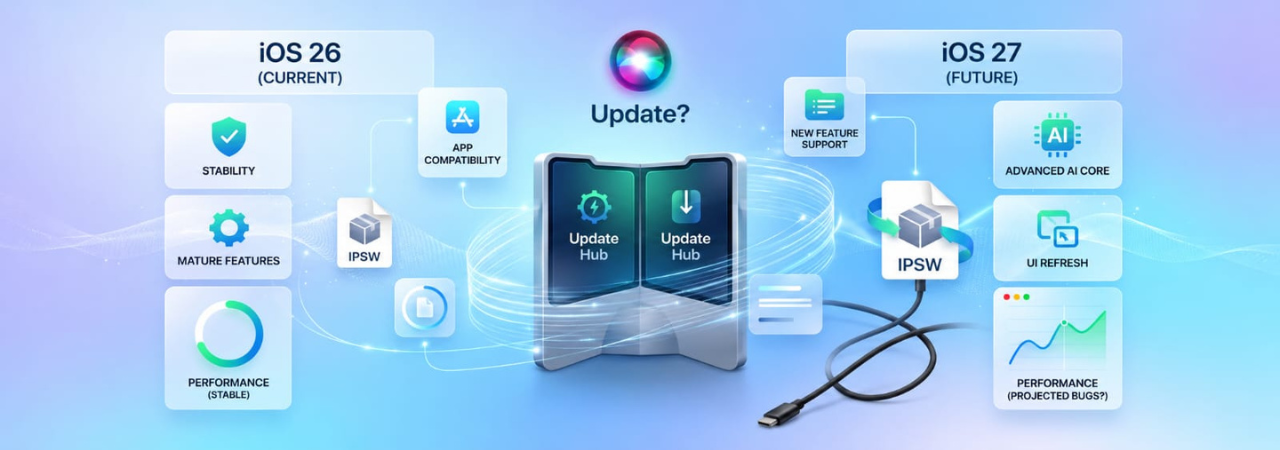
iOS 27 is currently in beta, with new builds shipping regularly ahead of its expected September 2026 release alongside the iPhone 18. This page is for anyone trying to decide whether to update from iOS 26 now or wait — covering what is actually different between the two versions, who should update immediately, and who should hold off.
Direct Answer: If you are on iOS 26 and your device is working well, wait for the iOS 27 GA release in September 2026 rather than installing the beta now. The beta is suitable for developers testing app compatibility and early adopters who understand they may encounter bugs. If iOS 27 has already released publicly by the time you are reading this, the case for updating is straightforward for most users — iOS 27 supports the same devices as iOS 26 and there is no performance regression reported for the supported lineup.
iOS 27 vs iOS 26 — Key Differences
iOS 27 was announced at WWDC 2026 on June 8 with a focus on continued AI integration (Apple Intelligence), visual refinements, and inter-app communication improvements. Below is a factual comparison of the two versions based on publicly announced features.
| Area | iOS 26 | iOS 27 |
|---|---|---|
| Release status | Stable, GA since Sept 2025 | In beta; GA expected Sept 2026 |
| Supported devices | iPhone 11 and later, SE 2nd/3rd gen | Same — no models dropped |
| Apple Intelligence | Available on iPhone 15 Pro and later | Expanded availability; updated Writing Tools and Image Playground |
| Stability | Mature, point releases through iOS 26.x | Beta — expect bugs until GA |
| App compatibility | Full ecosystem support | Some apps not yet updated for iOS 27 |
| Security patches | Receiving point releases | Beta patches only; GA will include full security hardening |
Who Should Update to iOS 27 Now (Beta)
The beta is appropriate for you if:
- You are a developer testing app compatibility before the September GA release
- You have a secondary device you are willing to run beta software on
- You want early access to iOS 27 features and understand that bugs are expected
- Your work does not depend on specific apps that may not yet be iOS 27-compatible
Who Should Wait
Stay on iOS 26 for now if:
- Your primary iPhone is your work device — beta software can introduce bugs that disrupt daily use
- You rely on specific apps that have not been updated for iOS 27 compatibility
- You are on an older supported device (iPhone 11–13) — early betas occasionally have more pronounced performance issues on older hardware
- You cannot afford any downtime — beta recovery requires a computer and IPSW restore if something goes wrong
The Downgrade Window — Time-Sensitive
If you update to iOS 27 beta and decide you want iOS 26 back, you need to act before Apple closes iOS 26 signing. Apple typically stops signing the previous major version within 2–4 weeks of the new major release shipping publicly. Once iOS 27 is GA (September 2026), that window will close quickly.
For the full downgrade process, see How to Downgrade iOS 27 to iOS 26. To check whether iOS 26 is currently signed, visit IPSW.io's iPhone firmware page.
Performance: iOS 27 vs iOS 26 on Older Devices
Performance reports for iOS 27 on supported older devices (iPhone 11, 12, 13) are mixed, as expected for beta software. The public GA release typically resolves beta-specific performance regressions. If you are on an older supported device:
- Wait for the GA release and the first point update (iOS 27.0.1) before drawing conclusions
- Apple Intelligence features that drove iOS 27 are only available on iPhone 15 Pro and later — older devices get the OS update without those specific features
Security: Should You Update for Security Alone?
iOS 26 continues to receive security patches through point releases (iOS 26.x). Apple does not cut off security support for the previous major version the moment a new one is released — you will receive security updates on iOS 26 until at least the iOS 27 GA release. Once iOS 27 ships publicly, Apple's focus shifts to iOS 27 patches, and iOS 26 security updates become infrequent.
If security is your primary concern and iOS 27 has already released publicly, update.
iOS 27 Device Compatibility — Is Your iPhone Supported?
iOS 27 supports the same device lineup as iOS 26: every iPhone from iPhone 11 onward, plus iPhone SE (2nd and 3rd generation). No models were dropped. For a full device-by-device breakdown including chip generation and feature eligibility, see iOS 27 Supported Devices & Compatibility.
If You Decide to Update: How to Do It Safely
- Back up first. iCloud Backup (Settings → [Your Name] → iCloud → iCloud Backup → Back Up Now) or a local backup via Finder/Apple Devices.
- Check available storage. You need at least 6 GB free for the OTA download.
- Update over Wi-Fi on a stable connection.
- Go to Settings → General → Software Update. If you are not enrolled in the beta, iOS 27 will appear here after GA. For the beta, enroll via Beta Updates in Settings first.
If the update fails, see iOS 27 Update Failed or Stuck — How to Fix It.
FAQ
Should I update to iOS 27 from iOS 26?
If iOS 27 has released publicly (expected September 2026), yes — it supports the same devices as iOS 26 with no performance regression reported for GA builds. If iOS 27 is still in beta, wait unless you are a developer or knowingly testing beta software.
Is iOS 27 faster than iOS 26?
Beta versions are not a reliable indicator of final performance. GA releases are typically optimized. iOS 26 and iOS 27 run on the same hardware with no architectural changes that would make one categorically faster. Wait for the GA release to make a fair comparison.
Will iOS 27 slow down my older iPhone?
Beta builds occasionally have performance issues on older supported hardware that are resolved before GA. If you are on iPhone 11, 12, or 13, waiting for the GA release and first point update is the safer approach before evaluating performance.
Does iOS 27 support my iPhone?
iOS 27 supports iPhone 11 and later, plus iPhone SE 2nd and 3rd generation — the same lineup as iOS 26. iPhone X, XS, XR, 8, and 7 are not supported. See iOS 27 Supported Devices & Compatibility for the full list.
Can I go back to iOS 26 if I don't like iOS 27?
Yes, but only while iOS 26 is still signed by Apple — typically a 2–4 week window after iOS 27's GA release. After that, downgrading is not possible. See How to Downgrade iOS 27 to iOS 26.
Is iOS 27 stable enough to use as my main OS?
In beta: not recommended for your primary device if you depend on it for work. The GA release in September 2026 will be stable. The first point update (iOS 27.0.1) typically resolves the most common post-launch issues.
What new features does iOS 27 add over iOS 26?
iOS 27 expands Apple Intelligence availability and updates Writing Tools and Image Playground. Specific feature lists continue to evolve through the beta cycle. Apple's official release notes are the authoritative source for a complete feature breakdown.


