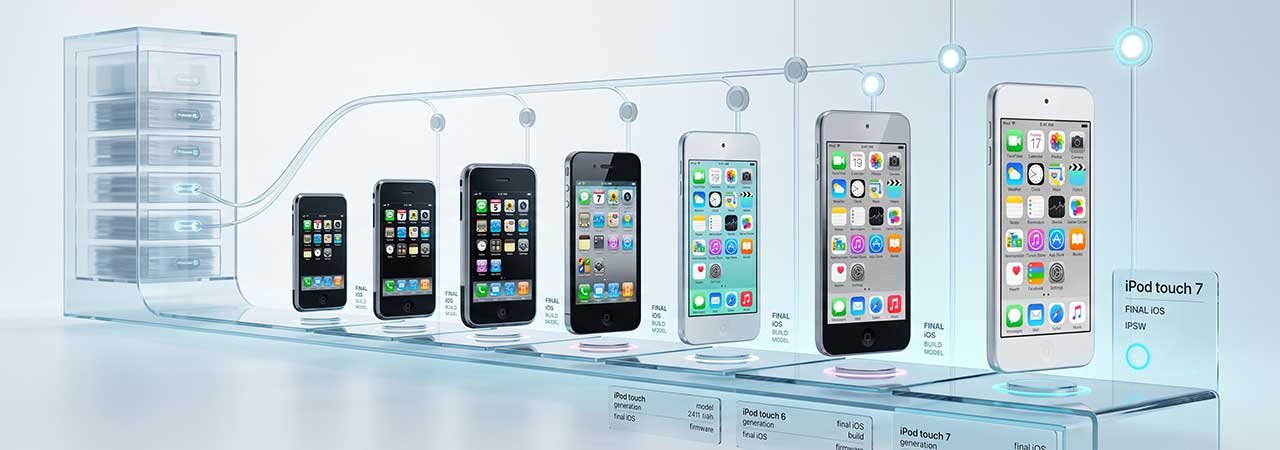
The iPod touch ran for seven generations across 15 years before Apple discontinued the entire iPod line in 2022 — and none of those generations have a page on this site. Here is exactly which final iOS build applies to each one.
You can browse every model from the iPod firmware page. For the iPhone and iPad identifier systems, see iPad Firmware: IPSW Downloads for Every iPad Model and browse the iPhone firmware page.
Direct Answer: Final builds range from iOS 1.1.5 on the original 2007 iPod touch up to iOS 15.8.8 on the 7th-generation model, Apple's last iPod ever made. Which generation you have determines both the final version and, for the very first model, whether a standard restore is possible at all.
iPod touch Model Identifiers and Final Builds
| Generation | Identifier | Final iOS | Download |
|---|---|---|---|
| iPod touch (1st gen) | iPod1,1 | iOS 1.1.5 (4B1) | iPod1,1 firmware |
| iPod touch (2nd gen) | iPod2,1 | iOS 4.2.1 (8C148) | iPod2,1 firmware |
| iPod touch (3rd gen) | iPod3,1 | iOS 5.1.1 (9B206) | iPod3,1 firmware |
| iPod touch (4th gen) | iPod4,1 | iOS 6.1.6 (10B500) | iPod4,1 firmware |
| iPod touch (5th gen) | iPod5,1 | iOS 9.3.5 (13G36) | iPod5,1 firmware |
| iPod touch (6th gen) | iPod7,1 | iOS 12.5.8 (16H88) | iPod7,1 firmware |
| iPod touch (7th gen) | iPod9,1 | iOS 15.8.8 (19H422) | iPod9,1 firmware |
Note the identifier jump from iPod5,1 to iPod7,1 — there is no iPod6,1. Apple's internal numbering skipped a generation; this is not a typo. Confirm your exact model at Settings → General → About → Model Number.
The 1st-Generation iPod touch Cannot Be Restored Through a Standard Signed IPSW
This is the one genuinely unusual case on this list. Checked directly against Apple's firmware catalog, the original 2007 iPod touch (iPod1,1) has no signed build at all — not just an old one, none. Its only firmware, iOS 1.1.5, shows as unsigned. In practice this means a standard restore through Finder, the Apple Devices app, or iTunes is not a live option for this specific model, regardless of which IPSW file you have. This predates the modern per-build signing infrastructure that every later Apple device relies on.
Why the Later Generations' Final Builds Differ So Much
Each generation's chip set its own iOS ceiling, the same pattern seen across the iPhone and iPad lines from the same years: the 4th-gen's A4 stopped at iOS 6, the 5th-gen's A5 stopped at iOS 9, the 6th-gen's A8 stopped at iOS 12, and the 7th-gen's A10 Fusion — the same chip as the iPhone 7 — reached iOS 15. The 7th generation, released in 2019, was the final iPod Apple ever made before discontinuing the entire product line in 2022.
What EOL Means for These Devices
- Generations 1 through 4 have a genuine 32-bit problem: their chips predate Apple's 64-bit transition, so the overwhelming majority of current apps cannot install regardless of iOS version.
- Generations 5 through 7 are 64-bit but still capped by minimum iOS requirements: current apps requiring newer iOS versions won't install, even though the architecture itself isn't the blocker.
- Security patching has ended for every generation: each final build is the permanent end of the line, not a current snapshot.
- Realistic use case: later generations function as basic media players, offline app devices, or Wi-Fi-only communication devices; the earliest generations are largely collector's items at this point.
Currently Signed Builds (Verify Live)
Because every generation reached end-of-life, their final builds (where signed at all) have remained the only option and are unlikely to change. Confirm current status on your identifier's device page before restoring — see how to check IPSW signing status.
Restoring an iPod touch Using an IPSW File
- Back up any data you need — restoring erases the device.
- Download the IPSW matching your exact generation and identifier. Confirm it is signed — and note that the 1st generation cannot be restored this way at all.
- Disable Find My if enabled, in Settings under your Apple ID or iCloud depending on the iOS version.
- Connect the iPod to a Mac or PC. Generations 1–4 use the 30-pin dock connector; generations 5–7 use Lightning.
- Open Finder (recent macOS), Apple Devices, or iTunes and select the device. Older generations generally require iTunes rather than Finder or Apple Devices.
- Hold Option (Mac) or Shift (Windows), click Restore, and select the downloaded IPSW file.
If the device gets stuck during restore, see Boot Loop Fix: Recover Without Losing Data for DFU-mode recovery steps — the same DFU process applies to iPod touch.
You can browse every model from the iPod firmware page, or see the iPad Firmware guide and iPhone firmware page for other product lines.
FAQ
What is the last iOS version for the iPod touch?
It depends on the generation, ranging from iOS 1.1.5 on the 1st generation to iOS 15.8.8 on the 7th and final generation. See the table above for your exact identifier.
Can the original iPod touch be restored with an IPSW?
Not through a standard restore. Checked directly against Apple's firmware catalog, the 1st-generation iPod touch (iPod1,1) has no signed build at all, so Finder, Apple Devices, and iTunes will all reject a restore attempt regardless of the file used.
Why is there no iPod6,1 identifier?
Apple's internal numbering skipped from iPod5,1 (5th generation) to iPod7,1 (6th generation). This is a genuine gap in the sequence, not a naming error on this page.
What was the last iPod ever made?
The iPod touch (7th generation), released in 2019 and discontinued in 2022 when Apple ended the entire iPod product line. It reached iOS 15.8.8, the highest final build of any iPod.
Are older iPod touch generations still useful in 2026?
For basic tasks — media playback, offline apps — the 5th, 6th, and 7th generations remain usable. The 1st through 4th generations are largely limited to collector or archival use given their 32-bit chips and, for the 1st generation, the complete lack of a signed restore path.


